


The Digital Photo Frame Gift Plan for 2026: Check Their Wi-Fi at Thanksgiving, Buy on Black Friday, Load the Photos Before You Wrap It
You'll be at their house on Thursday. Use it.
Thanksgiving is the one day a year you're standing next to their router. Black Friday is the next morning. That's the whole plan.
Every family has a drawer. In it is the tablet you bought Grandpa in 2019, the smart speaker that only ever played the wrong song, and a fitness tracker still holding 40% of its first charge. Every gadget in the drawer was a great idea on December 25th.
A digital photo frame is one of the few gadgets that stays out of the drawer. It sits on the counter, it shows the grandkids, and nobody has to learn anything. If it's set up right, the person you give it to never touches a setting. If it isn't, you'll spend New Year's Day on FaceTime saying "no, the OTHER button."
What decides which of those you get is mostly stuff you can check this Thursday, between the turkey and the pie: their Wi-Fi, where the frame will plug in, and who in the family is actually going to send photos. The rest is reading the subscription fine print before Black Friday.
The short answer
- At Thanksgiving, get their Wi-Fi name and password, exactly. Some frames only join a 2.4GHz network.
- Find the outlet. Nearly every frame is plugged in for good.
- Get the family to install the frame's app while they're all at the table.
- Before you buy, read what the app charges for. Remote settings, videos and storage are the usual paid extras.
- Load it with photos before you wrap it, so it works the moment it's plugged in.
- Check the "was" price. One frame we looked at claimed a was-price $85 higher than the same frame in black.
Compare live prices and real owner reviews for digital photo frames on Avorio →
The plan, in four dates
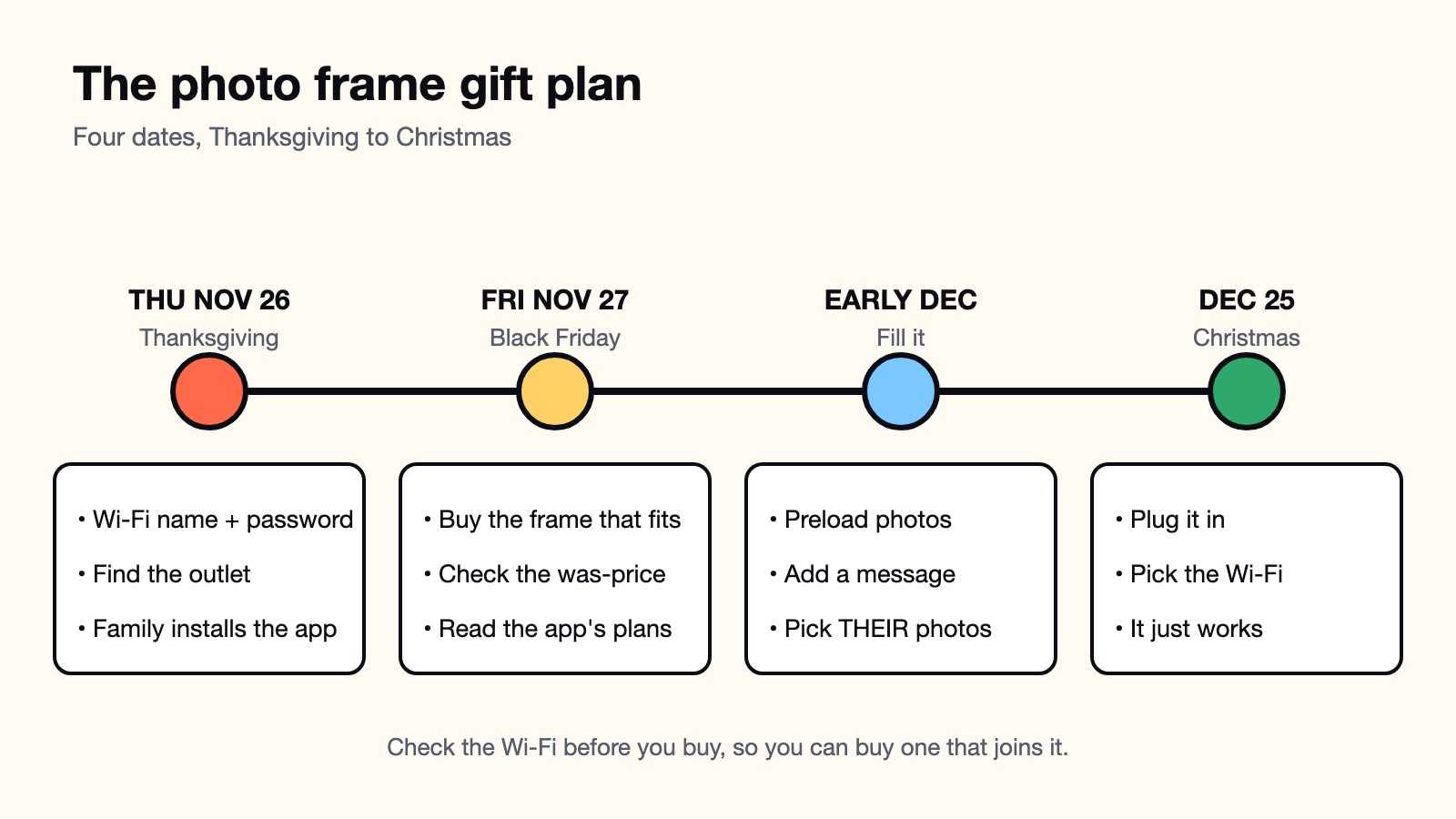
The order matters. If you buy first and check the Wi-Fi later, you find out on Christmas morning that the frame won't join their network, and you're stuck in their living room with a router manual. If you check on Thursday, you buy the frame that works with what they have.
Thursday: the recon mission
You need three things from their house, and you can get all of them without anyone noticing you're planning a gift.
The Wi-Fi name and password, written down exactly. Most Aura frames need a 2.4GHz network, according to Aura's own help center; its Walden and Aspen models also work on 5GHz. Most routers broadcast both, but if theirs puts the two bands under one name, the frame can get confused. If a gifted Aura frame can't connect, someone has to fix its Wi-Fi settings on site through the app, so this is the one thing you want right before you leave.
The outlet. A frame runs off the wall, all the time. Look at where it would sit and whether a cord reaches without running across the stove.
The senders. A frame that only you send photos to is a frame that shows your photos. Most families mean to send pictures and then don't. The fix is to get everyone to install the app at the table, while they're full and agreeable.
Answer a few questions about the person you're buying for, and see how this is going to go:
Your tech support forecast
Five questions about the person getting the frame. We'll tell you how many calls to expect.
1/5 Their Wi-Fi situation is…
Who pays for what after Christmas
The frame is a one-time purchase. The app is where the bill shows up, and every brand draws the line somewhere different. Here's what each one charged for when we checked on November 19.
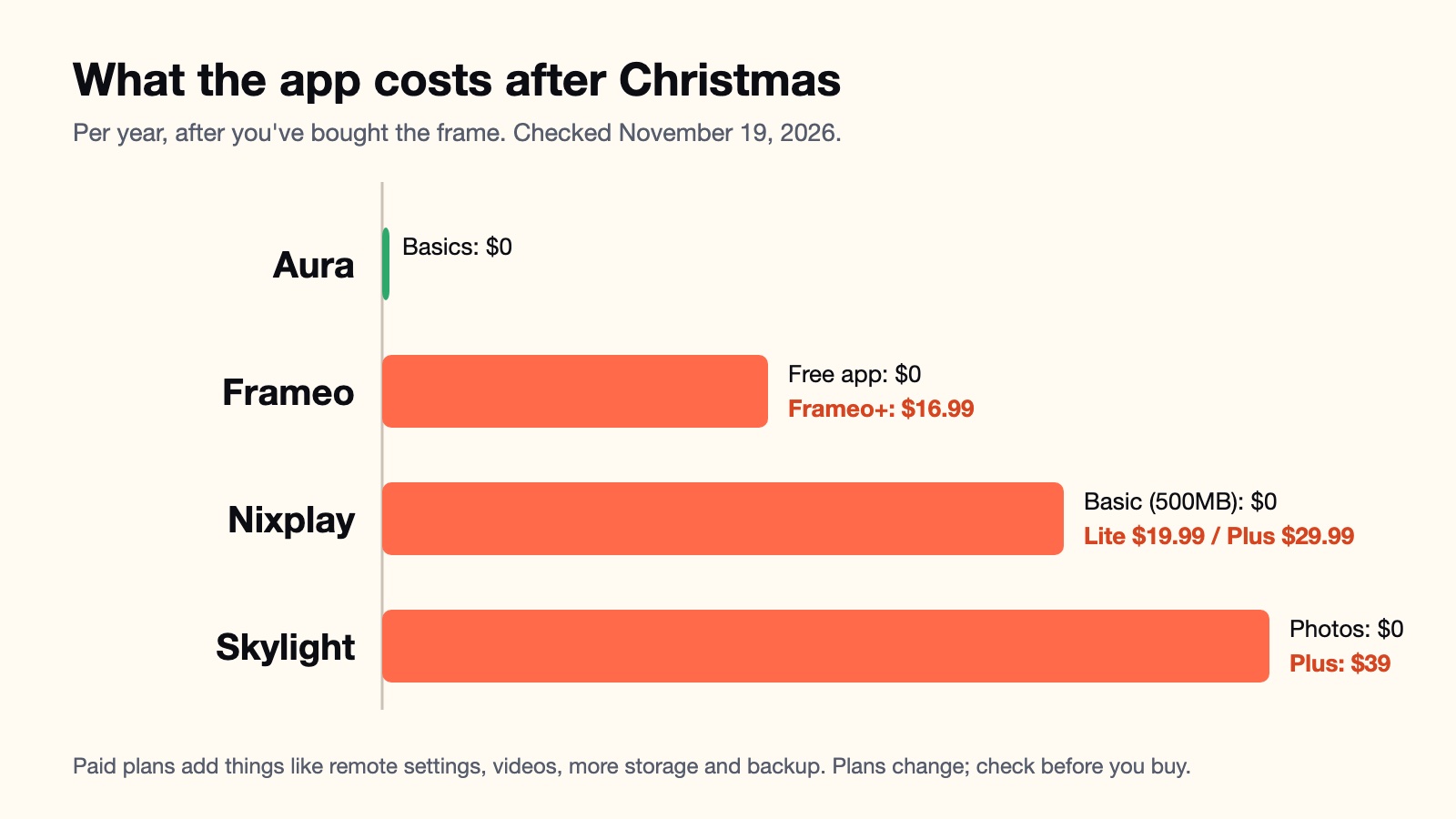
- Aura doesn't charge a subscription for the basics and includes unlimited cloud storage for photos.
- Skylight's photo sharing, by email or app, is free. Its Plus plan is $39 a year and adds videos, captions, remote settings and cloud backup. One plan covers a household's frames.
- Frameo is the app behind a lot of cheaper frames from other brands. It's free, and lets you send up to 10 photos at a time. Frameo+ is $16.99 a year on Frameo's site and adds batches of 100, two-minute videos, remote photo management and backup. The app only works with official Frameo frames, so check the box says Frameo.
- Nixplay is the cautionary tale. In April 2025 it moved free users to a Basic plan with 500MB of cloud photo storage and one shared album, and switched off Google Photos and Dropbox albums for free accounts. At roughly 2 to 4MB per phone photo, 500MB holds a couple of hundred pictures. More costs $19.99 a year for 100GB or $29.99 for unlimited.
None of these is a bad price. The point is to know before you give it, because remote settings matter most to the person who lives a flight away, and that's the person most likely to skip reading the plan page.
Fill it before you wrap it
A frame that arrives empty is a frame that asks for a setup session. Two of the big brands let you skip that. Aura's gift setup lets you preload photos and a message before you give it, and they show up once the frame joins the recipient's Wi-Fi. Skylight's Gift Mode lets you preload photos without unboxing the frame at all.
Choose the photos for them, not for you. Your sunset in Tulum is a lovely photo, and Grandma will look at it about as long as you look at her photos of the neighbor's dog. Grandkids, family dinners, the old house, the dog. This year's Thanksgiving table is a good start, so take a few on Thursday that aren't of the turkey.
Read the Black Friday price carefully
Frames are already on sale. When we checked on Amazon on November 19:
- Aura Carver 10" in black: $139, against a $149 was-price.
- The same Aura Carver in the Fossil color: $117, against a was-price of $234.
- Skylight 10" frame in black: $109.99, against $139.99. The Skylight Frame 2 with a touchscreen was $179.99.
- 10.1-inch Frameo frames with 32GB: about $50 to $57, against was-prices around $65 to $70.
- Pix-Star LUX 10.4": $159.99, with no was-price shown.
That Fossil listing is the one to look at twice. The same frame in black claimed a $149 was-price on the same day. A cheap price is still a cheap price, but the 50% badge is doing a lot of the work. Look at what a frame sold for over the last few months before you trust the percentage.
Deal or dud?
Things photo frame listings really say in November. Call each one before you peek.
UNLIMITED FREE cloud storage FOREVER!
Preload photos and a message before you give it.
WAS $234, NOW $117!! 50% OFF
Works on 2.4GHz and 5GHz Wi-Fi.
4K ULTRA HD 10.1 inch 32GB!!!
★★★★★ "Grandma LOVES it!!" (posted December 26)
The reviews worth reading come from people who've had a frame for a year or two. Day-one reviews tell you it was easy to unbox. Owners in their second year tell you whether the app still works, whether the family still sends photos, and whether the free plan stayed free. Nixplay's 2025 change only showed up in reviews from people who had owned their frames for years.
Use Avorio to read long-term owner reviews, see what Reddit says about each app's paid plan, and find the best live Black Friday price on a digital photo frame before you wrap it →
Avorio gathers thousands of real user reviews from Reddit, YouTube, and social media and filters out sponsored and AI-generated content. It scores ease of setup, app reliability, and screen quality, and finds the lowest live price.
Search digital photo frames on Avorio →
Frequently asked questions
Do digital photo frames need a subscription?
Most don't need one to show photos, but each brand puts something behind a paid plan. When we checked, Skylight's photo sharing was free and its Plus plan ($39 a year) added videos, captions, remote settings and cloud backup. Frameo's app is free, and Frameo+ ($16.99 a year on its own site) adds bigger batches, videos and remote management. Nixplay cut its free plan to 500MB of cloud storage in April 2025. Aura doesn't charge a subscription for the basics. Check the current plan page before you buy, because these change.
Do digital photo frames work without Wi-Fi?
Cloud frames like Aura, Skylight and Frameo need Wi-Fi to receive new photos. Without it, they only show what was already loaded. If the person has no Wi-Fi, look for a frame that reads an SD card or USB stick, and plan to swap it when you visit.
Can I set up a digital photo frame before I give it?
Yes, and you should. Aura lets you preload photos and a message before you gift it, and the photos appear once the frame joins the recipient's Wi-Fi. Skylight's Gift Mode lets you preload photos without unboxing the frame. Either way, you still need their Wi-Fi name and password on the day it's set up.
Can the whole family send photos to one frame?
On most Wi-Fi frames, yes. Skylight frames get an email address anyone can send photos to, and they can use its app too. Aura and Frameo work through their apps, where you invite or connect family members. Getting everyone to install the app while they're at the same table is the easiest way to make it happen.
Avorio filters out sponsored content to show real product reviews from Reddit, YouTube, and social media, and finds the best live prices. Search digital photo frames on Avorio →